

The first real bottleneck in yard logistics is directly at the plant entrance, where arriving trucks need to be identified, assigned to a delivery and the corresponding loading station and called for loading in a timely manner: Without an efficient solution for check-in and check-out long waiting times, traffic jams, frustration and accidents are bound to happen.

No more bottlenecks
VAS Driver Self Service
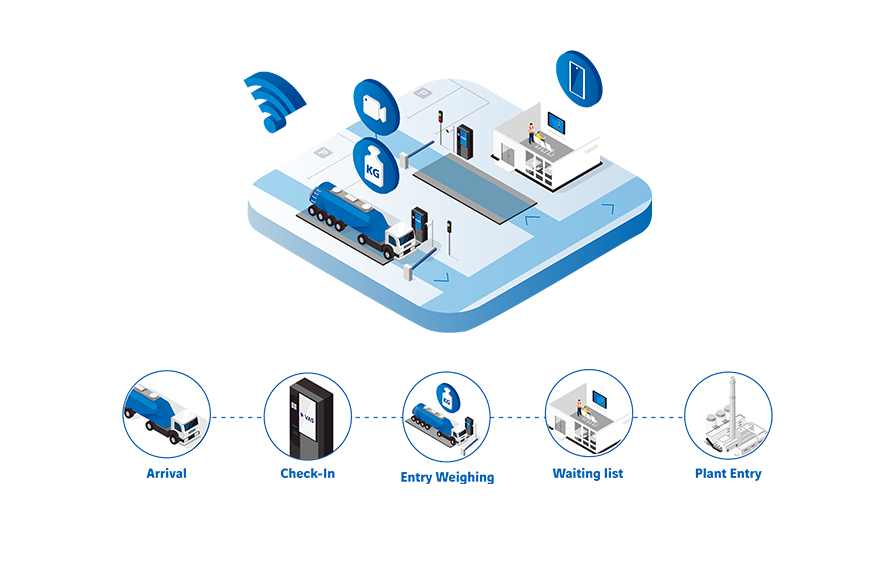
The VAS driver self service for check-in and check-out and the VAS waiting list are designed to make the process of navigating trucks through the bulk material plant efficient, safe and seamlessly automated: Guided by our self-service terminals, the truck drivers themselves can perform the check-in and check-out process including the weighing of the truck.
The driver only needs an QR-Code that contains all relevant delivery information or a comparable method of identification for using the VAS Self Service at Check-In.
At a glance
Your benefits with VAS Self Service
The integration of the Driver Self Service Check-In into VAS Yard Management ensures a smooth and error-free, 24/7 available, fully automated Check-In process, as all data is automatically matched. This also applies for Check-Out.
Depending on your plants requirements and workflows, individual configurations such as safety checks, security regulation info screens or a display of operating hours can be provided directly at Check-In and Check-Out.
Thanks to VAS multi-language support, the driver can perform the Check-In and Check-Out in the language he is the most familiar with. This ensures maximum security as it eliminates language barriers and misunderstandings. New languages can easily be added to VAS.
Yard Automation: VAS Driver Self Service
The Check-In Process
Registration at the terminal
The VAS Check-In process starts with the registration at the Self-Service Terminal and is designed to fit a variety of scenarios: Whether the delivery was pre-planned or happens spontaneously, at check-in the driver can register the truck and his assigned order or delivery using various identification methods such as TAN, order number, QR-Code, RFID Tag or Number Plate Recognition.
When checking in to pick up a dispatched delivery, specific methods of identification like TANs or QR-Codes can be used. These contain all relevant delivery information such as material, quantity, receiver etc.: This information is automatically checked against the delivery specification in the VAS Yard Management.
Additionally, the truck is registered either by automatic number plate recognition or by the driver. If the truck was pre-defined in the delivery, the system automatically checks whether the correct truck shows up to execute the delivery.
Spontaneous material retrieval may occur if a customer pulls material based on their contract (framework agreement) without prior disposition and announcement to the supplier. In this case, the contract number is required to perform the Self Check-In: The system automatically checks what materials and what quantities can be retrieved based on the current contract.
Self-Service Entry Weighing
Integrating the entry weighing into the self service Check-In process is highly recommended as the tare weight forms the basis for subsequent processes like calculating the gross material load. The system will automatically check the plausibility of the weighing result and flag any weights that don´t match the weight associated with the vehicle type.
The tare weight can be registered both with and without a connected weighbridge at the terminal:
With weighbridges connected directly to VAS Yard Management, the drivers can start the weighing process at the self-service terminal at the tap of a button; the recorded weight is sent straight to VAS Yard Management.
When there is no online weighbridge connection, the tare weight can be manually registiered at the Self Service Terminal for further use in VAS Yard Management.
Discover further solutions
For maximum security at Check-In and Check-Out
SafetyFlow: Digital Trainings and Access Control
There are safety rules on your factory premises – but do your visitors know them? With VAS SafetyFlow, you can ensure that visitors, drivers, or external service providers only gain access to the factory premises if they have completed the necessary safety training.
discover SafetyFlow
Automated Number Plate Recognition (ANPR)
Intelligent camera systems, e.g. by Tattile, Mobotix or other providers, automatically take pictures of the number plate of incoming trucks, actively recognizes them and sends this information directly to the VAS Yard Management, enabling further automation and control.
learn more
More safety for in-and outbound processes
Finding out what´s exactly on the truck bed is often labour intensive and error-prone. Unless you use Smart Material Analysis, the AI-powered VAS module powered by Opotcycle that automatically recognizes and analyzes incoming and outgoing materials.
discover smart material analysis
Automated delivery note creation: Driver Self-Service at Check-Out
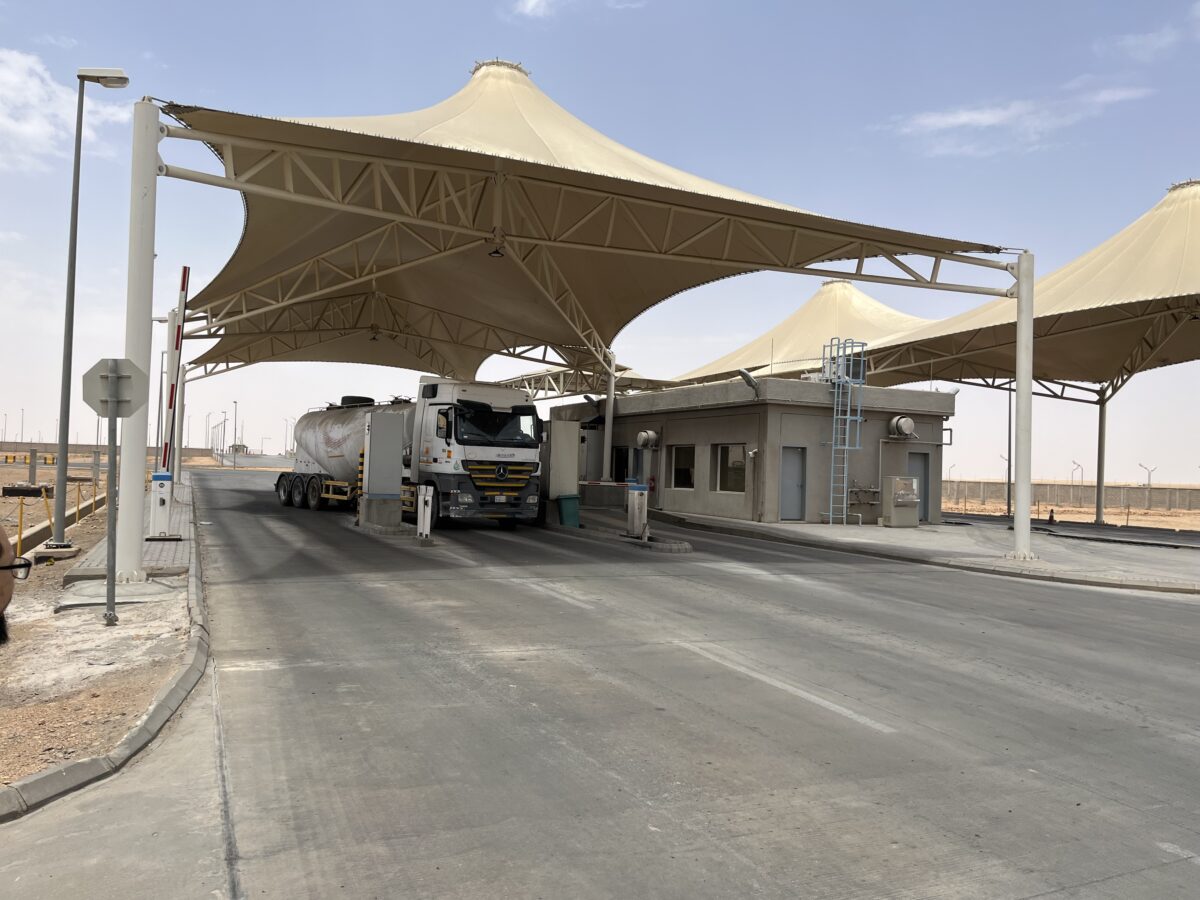
Of course, the Check-Out process can also be fully automated: As with Check-In, the driver registers with a QR code or the loading note at the terminal and performs an exit weighing. The system checks all collected data for this delivery and automatically generates the delivery note. As soon as the driver has confirmed the receipt of the delivery note, exit from the plant will be granted (e.g. by sending the signal to open the barrier or switch the signal light to green).
Traffic Management at Check-In
Waiting list Management and Truck Calling Systems

Plant logistics can be complex – assigning the best loading area and the best loading time when multiple trucks arrive at the same time poses a challenge when manually done by plant staff.
A software driven truck queueing and calling system such as the VAS Waiting list management streamlines the plant traffic and makes the process transparent for both plant operators and drivers. The solution consists of the following modules:
Slot Planning
The Slot Planning functionality allows the plant staff to avoid the typical rush hour at plant entry with many truck queueing up at the same time: The deliveries can be evenly distributed across the whole day.
Hauliers and customers can allocate available time slots for their individual deliveries via a dedicated VAS platform – this also allows for more control and a more precise planning on customer side.
Waiting list
The waiting list manages and structures the truck sequence by loading stations and provides the drivers with an overview about estimated waiting times, loading area and truck status, making the process transparent.
Trucks that didn´t pre-book a slot are automatically added to the waiting list as soon as they have completed Check-In. They are then assigned to a waiting position according to a set of individually definable rules such as “First in, first out” (FIFO), equal distribution, priority regulations, consideration of vehicle type, etc.
Manual adjustments to the waiting-list can be made by the VAS operator, e.g giving the highest priority to a certain delivery.

Digital Truck Call Systems
A digital truck call system creates transparency by informing the truck driver about his current status and only calling trucks for entry when its their turn at the loading station. As VAS operates hardware independent, any technology can be used to keep drivers informed in real time:
Overview
Possible truck calling system configurations
As VAS operates hardware independent, any technology can be used to keep drivers informed in real time about their estimated wait time, their assigned loading area and the status of their loading orders:
Display of the current status and the trucks called up directly at the parking lot with weatherproof LED displays.
If you have a waiting room for truck drivers, you can display the waiting list, current status, or other information on one or more waiting room screens.
Acoustic signal: trucks can also be called for loading via loudspeakers.
This call cannot be missed: Call drivers via text message to the loading station.
The above-mentioned truck call systems can be combined as desired and individual setups can be implemented.
Check-In for your personalized demo
Say goodbye to traffic jams with VAS Check-In and Check-Out automation!
We are here to help you personally.

You are currently viewing a placeholder content from HubSpot. To access the actual content, click the button below. Please note that doing so will share data with third-party providers.
More Information